
One of the most common reasons for visa application rejection? Photo issues. From wrong dimensions to improper backgrounds, photo mistakes can delay your application by weeks or result in outright denial.
This comprehensive guide covers passport and visa photo requirements for major destinations worldwide. Whether you're applying for a US visa, UK visa, Schengen visa, or renewing your passport, we've got you covered. DoVisa's photo verification service helps ensure your photo meets all requirements before submission.
Universal Requirements (Most Countries)
While specific dimensions vary, most countries share these core requirements:
- Recent photo (taken within the last 6 months)
- Clear, in-focus image with proper exposure
- Neutral facial expression (no smiling with teeth visible)
- Eyes open and clearly visible
- Face centered and looking directly at camera
- Plain background (usually white or light gray)
- No headwear (except for religious reasons)
- No glasses (most countries now ban glasses entirely)
- Head and shoulders visible
- No digital alterations or filters
- Natural skin tone (no heavy makeup or editing)
- No shadows on face or background
The 6-Month Rule
Your photo must be taken within the last 6 months. If your appearance has changed significantly (new hairstyle, weight change, aged considerably), take a new photo even if your old one is recent.
United States Requirements
US Passport & Visa Photo Specs
| Specification | Requirement |
|---|---|
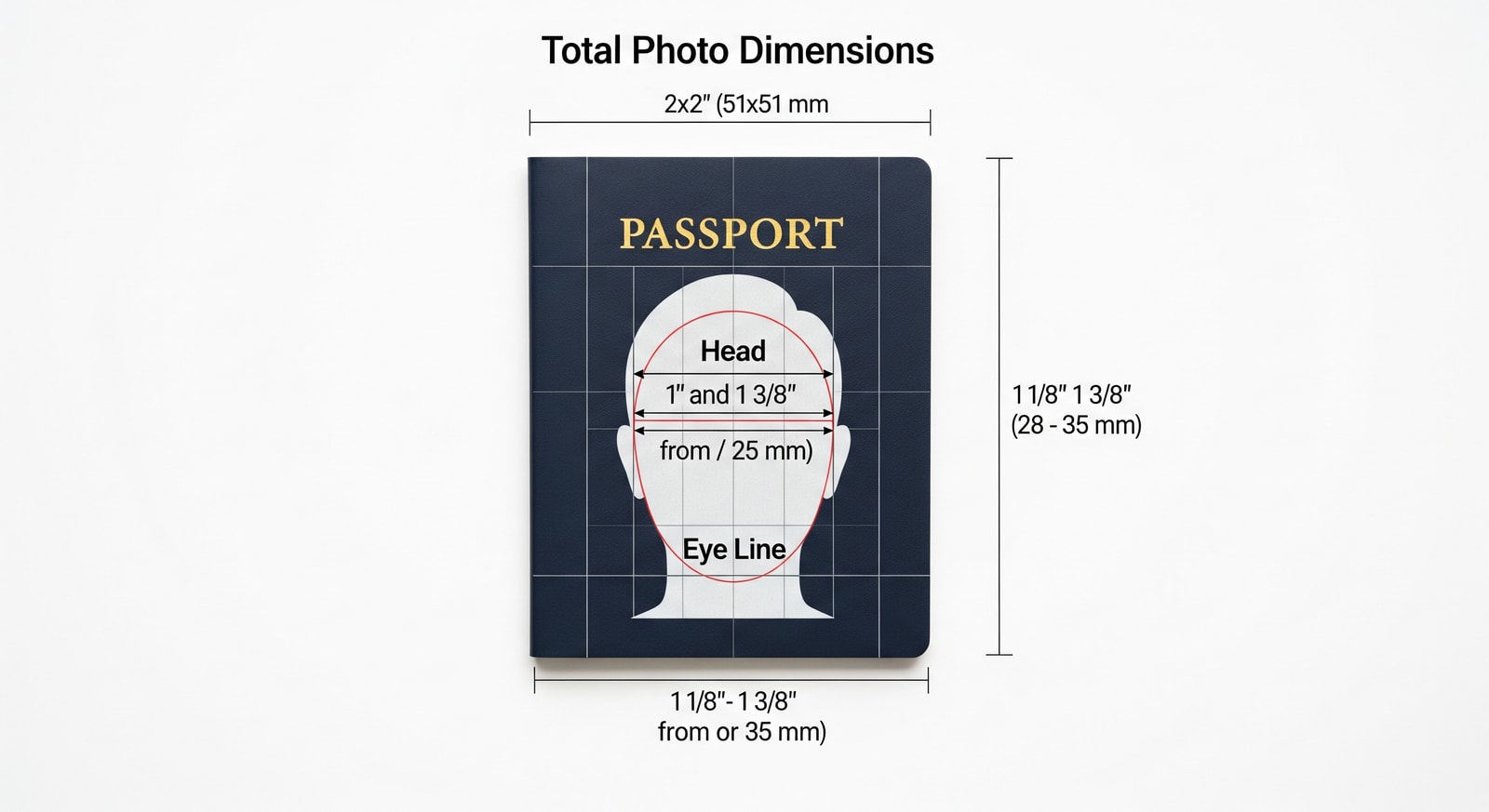
| Size | 2 x 2 inches (51 x 51 mm) |
| Head height | 1 - 1⅜ inches (25-35mm) |
| Eye height | 1⅛ - 1⅜ inches from bottom (28-35mm) |
| Background | Plain white or off-white |
| Resolution (digital) | 600 x 600 to 1200 x 1200 pixels |
| File size (digital) | 240KB max |
| File format | JPEG |
| Color | Full color |
US-Specific Rules
The US has banned glasses in passport and visa photos since 2016. Even clear glasses are not allowed. Contact lenses are permitted.
United Kingdom Requirements
UK Passport & Visa Photo Specs
| Specification | Requirement |
|---|---|
| Size | 35 x 45 mm |
| Head height | 29-34 mm (chin to crown) |
| Background | Plain light gray or cream |
| Resolution (digital) | 600 x 750 pixels minimum |
| File size (digital) | 50KB - 10MB |
| File format | JPEG |
| Color | Full color |
UK Digital Photo Service
The UK government offers a free online tool to check if your photo meets requirements before submitting. Use it at gov.uk/photos-for-passports
Schengen / EU Requirements
Schengen visa photos follow ICAO (International Civil Aviation Organization) standards, which are used across most EU countries:
Schengen Visa Photo Specs
| Specification | Requirement |
|---|---|
| Size | 35 x 45 mm |
| Head height | 32-36 mm (chin to crown) |
| Face coverage | 70-80% of photo |
| Background | Light gray (preferred) or white |
| Expression | Neutral, mouth closed |
| Glasses | Not allowed in most countries |
| Photo age | Taken within 6 months |
Country Variations
While Schengen countries follow similar standards, some have slight variations. Germany prefers light gray backgrounds, while France accepts light blue. Always check the specific embassy requirements for your destination.
India Requirements
India Passport & Visa Photo Specs
| Specification | Requirement |
|---|---|
| Size | 2 x 2 inches (51 x 51 mm) |
| Background | Plain white only |
| Face coverage | 50-60% of photo |
| Expression | Neutral (slight smile acceptable) |
| File size (e-Visa) | 10KB - 1MB |
| Dimensions (e-Visa) | 350 x 350 pixels minimum |
| File format | JPEG |
Indian e-Visa Specific
For India's e-Visa, you must upload a square photo (equal width and height). The photo must show full face with both ears visible. This is different from the physical visa which uses 2x2 inch prints.
China Requirements
China Visa Photo Specs
| Specification | Requirement |
|---|---|
| Size | 33 x 48 mm |
| Head height | 28-33 mm |
| Head width | 15-22 mm |
| Background | White only |
| Resolution (digital) | 354 x 472 pixels |
| File size | 40KB - 120KB |
| File format | JPEG |
| Expression | Neutral, mouth closed |
China's Unique Size
China uses a unique photo size (33 x 48 mm) that differs from most other countries. Many photo studios may not have this size readily available. Double-check before your appointment!
Quick Reference: Photo Sizes by Country
Photo Size Comparison
| Country/Region | Size (mm) | Size (inches) | Background |
|---|---|---|---|
| United States | 51 x 51 | 2 x 2 | White |
| United Kingdom | 35 x 45 | 1.4 x 1.8 | Light gray/cream |
| Schengen/EU | 35 x 45 | 1.4 x 1.8 | White/light gray |
| India | 51 x 51 | 2 x 2 | White |
| China | 33 x 48 | 1.3 x 1.9 | White |
| Japan | 35 x 45 | 1.4 x 1.8 | White/light gray |
| Australia | 35 x 45 | 1.4 x 1.8 | White |
| Canada | 50 x 70 | 2 x 2.8 | White/light gray |
| Brazil | 50 x 70 | 2 x 2.8 | White |
Common Photo Mistakes to Avoid
A professional photo booth will always produce acceptable photos
Photo booths are convenient but often produce poor quality or incorrectly sized photos. Many visa applications are rejected because of photo booth images. Professional photographers or DoVisa's photo service are more reliable options.
Top 10 Rejection Reasons
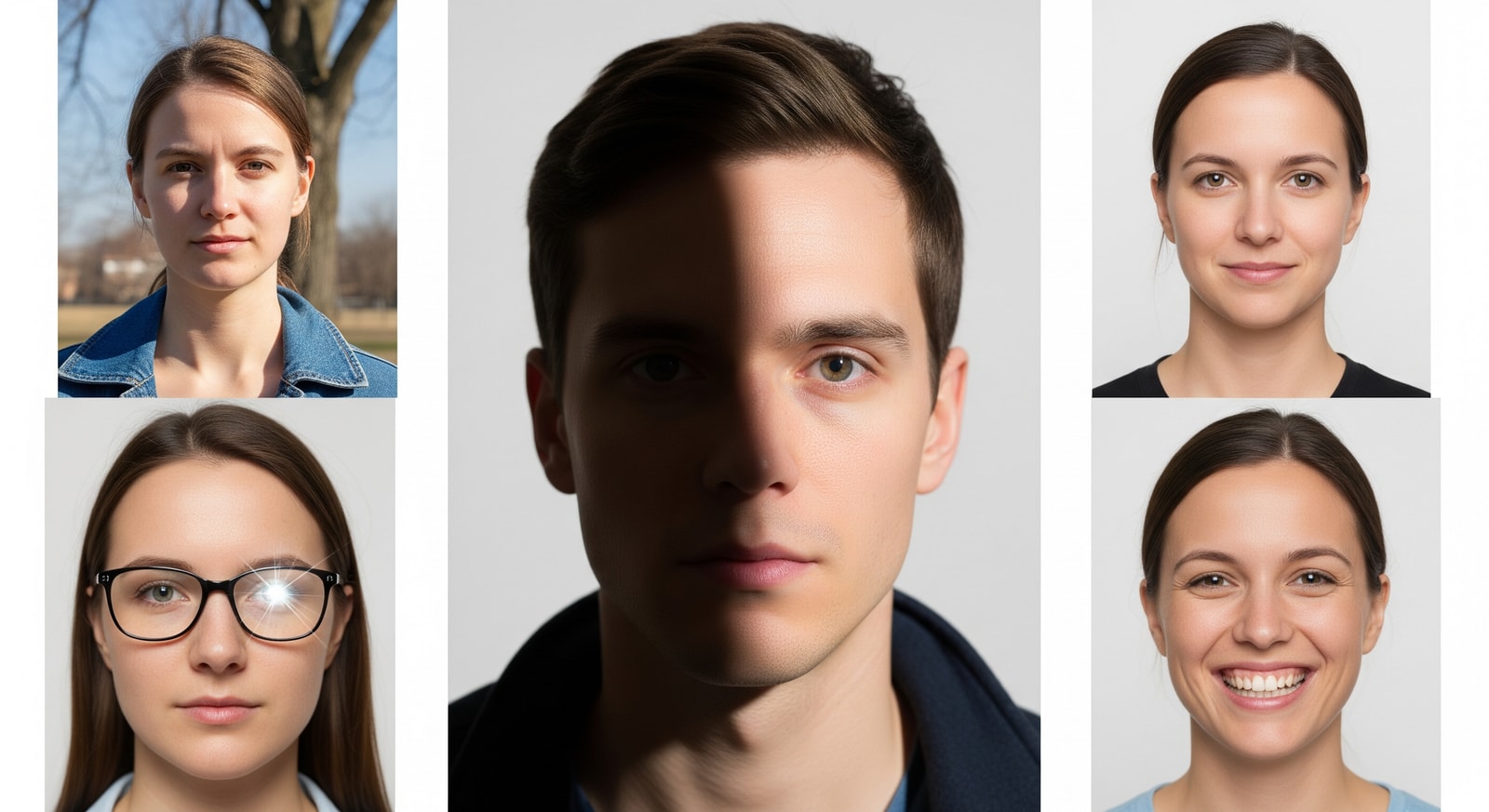
- Wrong dimensions: Size doesn't match country requirements
- Poor lighting: Shadows on face or background
- Incorrect background: Wrong color or not plain
- Glasses worn: Most countries now prohibit glasses
- Expression issues: Smiling too much or mouth open
- Eyes not visible: Hair covering eyes or eyes closed
- Head tilted: Face not centered or looking sideways
- Photo too old: Appearance has changed significantly
- Digital manipulation: Filters, retouching, or beauty mode
- Wrong file size/format: File too large/small for digital upload
Digital Photo Requirements
More visa applications now require digital photo uploads. Here's how to get it right:
- Check the required pixel dimensions (varies by country)
- Ensure file size is within the specified range
- Use JPEG format unless otherwise specified
- Don't compress the image too much (reduces quality)
- Avoid phone "beauty mode" or portrait enhancements
- Use good lighting (natural daylight is best)
- Take multiple shots and choose the best one
- Verify the photo meets requirements before uploading
DIY Digital Photos
You can take an acceptable digital photo at home with a smartphone if you: use a plain white wall as background, face a window for natural light (no direct sunlight), have someone else take the photo at eye level, and use a photo cropping tool to meet size requirements.
Special Cases
Religious Headwear
Most countries allow religious head coverings (hijab, turban, kippah) in passport photos, but with conditions:
- Face must be fully visible from chin to forehead
- No shadows on the face from the head covering
- Both edges of the face must be visible
- Some countries may require a letter explaining religious requirement
Infants and Young Children
Getting a good photo of a baby is challenging but required. Tips:
- Eyes must be open (for most countries)
- Lay baby on a white sheet and photograph from above
- No toys, pacifiers, or hands visible
- One parent can hold the child but must not be visible in photo
- Children under 6 may have slightly relaxed expression rules
Medical Exemptions
If you have a medical condition that affects your photo (e.g., you cannot remove an eye patch, have facial paralysis, or must wear specialized glasses), contact the embassy directly. Most countries will accommodate with proper medical documentation.
Photo Review Service
Have our experts check your photo before you apply
Why Use DoVisa's Photo Service?
Expert verification against country-specific requirements
AI-powered preliminary check for common errors
Human review for final approval
Guidance on fixes if issues are found
Compatible with all major visa applications
Trusted by thousands of successful applicants
Frequently Asked Questions
Can I smile in my passport photo?
Can I wear makeup in my passport photo?
Why can't I wear glasses anymore?
Can I use a photo from my phone?
How old can my photo be?
What if my photo is rejected?
Can I use the same photo for different visa applications?
Where should I get my passport photo taken?
What colors should I avoid wearing?
Can I edit my photo after taking it?
Get Your Photo Right with DoVisa
Don't let a photo mistake delay your visa application. DoVisa's document specialists can review your photo and ensure it meets requirements before you submit.
Our photo review service checks dimensions, background, face position, and all technical requirements specific to your destination country. Get peace of mind knowing your photo is right before you apply.
Get the DoVisa App
Take and verify your visa photo right from the app. Our AI checks requirements in real-time.



Comments(12)
Leave a Comment
This saved my Schengen visa application! I had no idea Germany preferred gray backgrounds. My local CVS only does white, so I went to a professional photographer instead.
The religious headwear section is really helpful. I wear a turban and wasn't sure if it would be accepted. Good to know it's allowed as long as my face is visible.
Getting my baby's passport photo was a NIGHTMARE until I read the tip about laying them on a white sheet. Worked perfectly! She's 4 months old and we got approved first try.
China's photo size is so annoying! Had to go to 3 different places before finding somewhere that could do 33x48mm. Wish more countries would standardize.
I didn't know glasses were banned now! Almost submitted my UK passport renewal with my old glasses photo. Thanks for the heads up.
Pro tip: Costco does passport photos and they're pretty good quality. Much cheaper than most pharmacies.
The comparison table is super useful! Printed it out and took it to my photo appointment so they knew exactly what I needed.
My India e-Visa was rejected twice because of photo issues. First time wrong size (not square), second time face wasn't centered. Third time I used a professional and it worked. Should have done that from the start!
Quick question - can I edit out a pimple in my photo or will that cause problems?
Took my own photo at home using this guide's tips. White wall, faced the window, had my wife take it at arm's length. Worked for my US passport!
I have heterochromia (two different colored eyes). Will this cause any issues with biometric scanning?
The phone photo tip actually works well. I used my iPhone's timer feature, propped it up on a stack of books, and stood against a white door. Perfect UK passport photo!